A modern server-level security strategy must address one of today’s most sophisticated cyberattack techniques: in-memory malware. These malicious payloads operate without leaving persistent traces on disk, making them extremely difficult to detect with traditional scanning methods.
To combat this threat, BitNinja has introduced a major enhancement to its security ecosystem: the Process Analysis module, now fully accessible through the BitNinja Console under the new Process Analysis page. This enables server administrators to review, manage, and act on suspicious PHP processes faster and more efficiently than ever before.
The Process Analysis module continuously monitors running PHP processes on your server. Unlike conventional malware detection tools, which focus primarily on file scanning this engine observes in-memory activity, making it capable of identifying malware families that attempt to hide by avoiding on-disk persistence.
When a suspicious or malicious process is detected, BitNinja automatically:
This proactive monitoring significantly reduces the amount of time malware can remain active, even when trying to avoid detection.
With the new Process Analysis page, server admins can now tracked and inspect all flagged or terminated PHP processes directly from the dashboard. This centralizes incident handling and improves visibility into suspicious activity.
☝ Note: To start using Process Analysis, the module must be enabled first in the Configuration section of the BitNinja Console.
If the module is not activated, the Process Analysis page will remain empty until monitoring is turned on.
On this page, users can:
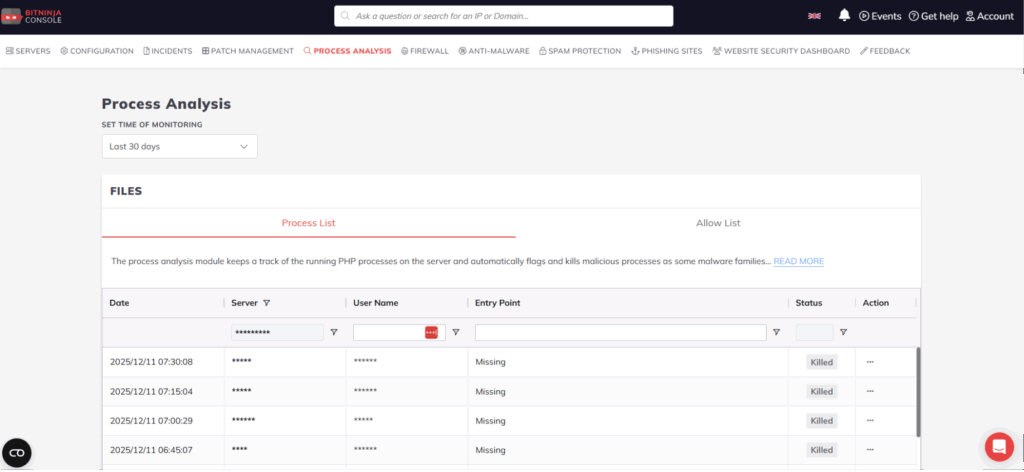
To support transparent threat handling, each process or related file receives a status. These provide instant insight into the stage of analysis or the result of BitNinja’s automated actions.
Inspecting
The related file is currently being analyzed by our AI-powered malware scanner.
In some cases, this process may take up to 48 hours to complete.
Killed
The process was killed because the script file file is no longer present. This is normally never happens, except with some in-memory malwares.
Benign
The file was flagged for analysis, but after inspection it was determined to be non-malicious.
Cleaned
The file was flagged as suspicious, confirmed to be malicious, and the malware removal system has successfully cleaned or quarantined the file.
Attackers increasingly depend on techniques that bypass traditional security tools:
This makes runtime behavior monitoring critical. BitNinja’s Process Analysis module closes this security gap by targeting active, running behaviors, not just static file signatures.
The release of the Process Analysis page in the BitNinja Console marks an important step toward more transparent, manageable, and effective server-level malware protection. With real-time tracking of PHP processes, AI-enhanced malware scanning, and automated remediation, BitNinja offers one of the most comprehensive defenses against in-memory threats.
For more information, visit the official documentation:
https://doc.bitninja.io/docs/modules/process_analysis/
Register now and explore the Process Analysis module in the BitNinja Console.
Have questions or feedback? Feel free to reach out to us, we’re here to help.